

Well, let’s be honest for a second—creating high-quality marketing content consistently is exhausting. One day you’re brainstorming ad ideas, the next you’re stuck staring at a product photo wondering, “How on earth do I turn this into something scroll-stopping?” That’s exactly where tools like MagicFit step in, promising to take a lot of that creative pressure off your shoulders.
In this review, I’m going to walk you through what MagicFit actually does, how it feels to use it, and whether it lives up to the buzz it’s been getting lately.
What is MagicFit, really?
At its core, MagicFit is an AI-powered content creation tool designed for marketers, e-commerce sellers, and basically anyone who needs to turn product images into engaging visual content.
But here’s the interesting part—it’s not just about editing photos. It’s more like having a mini creative team sitting quietly in your browser, ready to generate ads, videos, and visuals on demand.
You upload a product image, and within moments, MagicFit starts transforming it into something far more dynamic. Think lifestyle shots, video clips, and social media creatives that look like they took hours to produce.
If you’ve ever tried to shoot product content yourself—setting up lighting, backgrounds, angles—you’ll understand why that’s appealing.
 Turn any product photo into scroll-stopping content
First impressions: surprisingly simple
Actually, one of the first things you notice about MagicFit is how straightforward it feels. No steep learning curve. No cluttered dashboard trying to impress you with too many buttons.
You upload an image.
You choose a style or format.
You let the AI do its thing.
That’s it.
It almost feels too easy at first. You might even think, “Okay… but will the output actually be usable?”
And that’s where things get interesting.
Turning static images into dynamic content
Let’s say you’re selling a smartwatch. Normally, you’d need a model, a location, maybe some editing software to create a lifestyle shot.
With MagicFit, you upload your product image and generate visuals showing the watch being worn in different environments—gym, office, outdoors. It’s not perfect every time, but it’s impressively close.
This feature alone can save hours, if not days, of content production.
And for small business owners or solo entrepreneurs? That’s huge.
AI-generated video content
Now here’s where MagicFit really starts to stand out.
Instead of just giving you static images, it can turn your product into short-form video content—exactly the kind you see on TikTok or Instagram Reels.
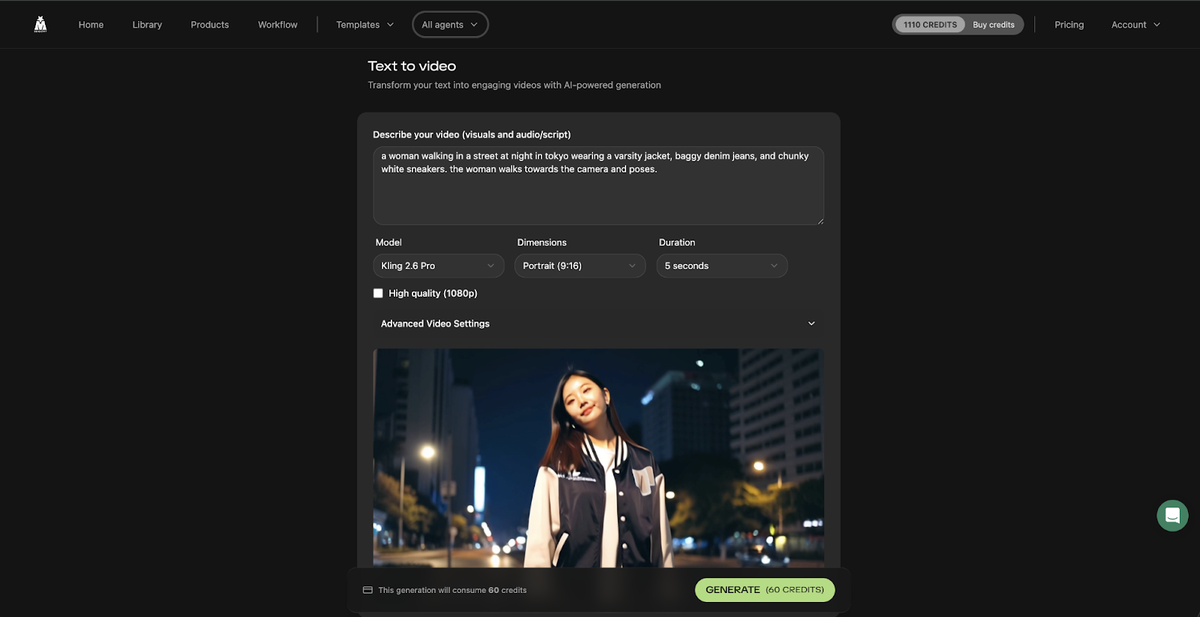 Write a script, get a video
Imagine this scenario:
You’ve got a skincare product. You upload the image. Within minutes, MagicFit generates a short video showcasing the product with transitions, text overlays, and even a basic storyline.
Is it Hollywood-level production? Of course not.
But is it good enough to run ads or post on social media? Surprisingly, yes.
That’s the kind of “good enough at scale” that modern marketing thrives on.
Background and scene transformation
One of the more fascinating features is how MagicFit handles backgrounds.
You’re no longer stuck with the original product setting. The tool can place your item into entirely new environments—clean studio setups, cozy home scenes, or even vibrant outdoor settings.
It reminds me a bit of green screen editing, except you don’t need any of the technical setup.
For example, a simple coffee mug can suddenly appear in a warm morning kitchen scene with sunlight pouring in. It’s subtle, but it makes a difference. People don’t just see the product—they imagine using it.
And that’s what sells.
Content variety without creative burnout
Here’s something people don’t talk about enough: creative fatigue.
When you’re running ads or managing a brand, you constantly need fresh content. New angles, new visuals, new ideas. It’s draining.
MagicFit helps ease that burden by generating multiple variations from a single input.
You can take one product image and end up with:
Several different visual styles
Multiple video variations
Different moods and tones
So instead of scrambling for new ideas every day, you’re essentially remixing what you already have.
That’s a smarter way to work.
Ad-style content generation
Another subtle but powerful feature is how MagicFit leans into ad-ready formats.
It doesn’t just create “nice-looking” visuals—it often structures content in a way that resembles actual ads. Think:
Attention-grabbing openings
Clean product focus
Text overlays that highlight benefits
It’s almost like the tool understands the rhythm of modern advertising.
 Launch ads and social posts without a designer
For someone who isn’t a professional copywriter or video editor, that’s incredibly helpful.
Real-world use case
Let’s paint a realistic picture.
You run a small online store selling fitness gear. You’ve got decent products, but your marketing? Not so great. You don’t have the budget for a creative agency, and doing everything yourself feels overwhelming.
You upload your product images into MagicFit (maybe through this link: MagicFit), and within an hour, you’ve got:
A handful of social media posts
A couple of short video ads
New lifestyle visuals
Suddenly, your brand looks more polished. More professional.
And you didn’t spend days creating it.
That’s the kind of leverage tools like this provide.
The “human touch” factor
Now, let’s address the elephant in the room.
Can MagicFit fully replace human creativity?
Not really.
There are moments when the output feels slightly artificial. Maybe the lighting isn’t perfect. Maybe a scene looks just a bit too “AI-generated.”
But here’s the thing—most people scrolling through social media won’t notice or care. They’re moving fast. They’re reacting to visuals in seconds.
And in that context, MagicFit performs well.
It’s not about perfection. It’s about speed, consistency, and volume.
Who is MagicFit best for?
Honestly, it shines most in situations where time and resources are limited.
If you’re:
Running an e-commerce store
Managing social media accounts
Testing ad creatives frequently
Working solo or with a small team
Then MagicFit can feel like a massive upgrade to your workflow.
Even marketers who already have design skills can benefit. It’s like having a shortcut for the repetitive parts of content creation.
Click Here To Learn More About MagicFit
MagicFit Appsumo Lifetime Deal
 You shouldn’t need to hire a production team to test a new content angle. MagicFit lets you turn a product photo or URL into scroll-stopping ads, videos, hooks, and social posts that are ready to launch in minutes. MagicFit Appsumo Deal
ONE-TIME PURCHASE OF $89 $120
How To Get an Extra 10% Discount on MagicFit?
- Visit the “MagicFit Lifetime AppSumo Deal” page.
- Wait for some seconds, An Discount popup will appear.
- Enter your Email to receive the exclusive benefits.
- Check Your Email Inbox For Next Instructions.
- Get a 10% discount at the end.
- Discount valid for new users only.
So if the main price of MagicFit is $89, after getting a 10% discount you can buy it for $80 for your Lifetime. hurray !!!

Alternative to: Canva
Integrations: Shopify
Best for: Ecommerce, Marketers, Small businesses
Final thoughts
So, is MagicFit worth paying attention to?
Yes—especially if you’re tired of the constant grind of content creation.
It doesn’t magically turn you into a world-class creative director overnight. But it does something arguably more valuable: it removes friction.
It helps you go from idea to execution faster.
And in today’s fast-moving digital world, speed matters just as much as creativity.
If you’re curious to explore it yourself, you can check it out here: MagicFit.
Just don’t expect miracles on the first try. Spend a little time experimenting, tweaking inputs, and understanding how it behaves.
Because once you get the hang of MagicFit, it starts to feel less like a tool—and more like a quiet creative partner working behind the scenes.
Do you Want 10% Discount On All Appsumo Products?
Click Here To Join On Appsumo Plus !
Alert !
Most deals are out of stock within a week of coming to Appsumo. So take it now if you need it. Also, check the amazing deal On this Site.